I just run the Sunspider Javascript test on Firefox 3.5.5 (latest stable version), 3.6 Beta 4 and 3.7 pre-Alpha.
The results will vary depending on your PC specifications and Operating System.
Mine was a Pentium Dual-Core 3.2 GHz with 2Gb Ram, running Ubuntu 10.04 Alpha 1 "Lucid Lynx" from a Live-USB.
So, the results were:
Firefox 3.5.5: 2306.4ms
Firefox 3.6b4: 2052.8ms
Firefox 3.7pre-a1: 1609.8ms
Well done Mozilla. That represents about 40% increase in Javascript speed. And what about competitive browsers?
Chrome 4.0.249.30 (beta): 812.0 ms
Opera 10.10: 7249.2ms
Well, not so well done I guess...But until Chrome gets 1/10th of Firefox's add-ons, I can't consider it as my first choice. Opera was inexplicably slow, maybe it has something to do with the Alpha version of Ubuntu... But Opera was the amazing feature of being a web server at the same time, which means you can stream your music from it, host your chat room or show your photos to your friends. Firefox is still my browser of choice because of the add-ons and I use Opera when I need this functionality. I hope Firefox and Chrome will release an edition with a built-in server in the feature.
Showing posts with label reviews. Show all posts
Showing posts with label reviews. Show all posts
Sunday, December 13, 2009


Sunday, November 22, 2009
Ubuntu 9.10 Karmic Koala. The best Ubuntu till now. Period.
Having tried the Alpha 5 in September and finding it stable and fast in my laptop, I was very eager to try the official release.
If reading the rest bores you, the verdict in 2 words is:
it rocks!!
And yes, the brown-orange theme has finally gone away!!
Ubuntu 9.04 Jaunty Jackalope had nice improvements such as the ext4 filesystem, which offered faster boot times among other advantages and the cool redesigned notification system, the disaster of the Intel graphics driver made it unusable to 50% of laptops... Having this terrible regression fixed by switching to the new UXA acceleration method, what new does Karmic Koala brought that made me and everyone else write dithyrambic reviews???
(Apart from trolls and Ubuntu-haters...)
First of all, ext4 has now matured enough and it is the default option on a new installation. It makes the boot process a lot faster, which is a big plus especially to netbooks.
In Karmic Koala, apart from the under the hood technical improvements, there were leaps in usability.
Usability improvements:
During the development of Karmic Koala, the 100 papercuts project started with the aim to fix minor annoyances, which experienced users wouldn't notice any more, but are visible to newcomers and adding up they could make a noticeable difference in usability.
While Ubuntu is being installed, there is a slideshow that guides users to the programs they need to use(Empathy for IM, Evolution for emails, F-Spot for photo album...) and most importantly to the Software Center in order to install programs. Amen!!!Finally the new Ubuntu user can figure out how to install a program without having to find someone who has done it before or ask in forums.The Software Center is a much improved version of the old Add/Remove(which many assumed that it was mainly for Uninstalling programs, like in the "intuitive" windows) and has the big advantage of fetching a screenshot of each application to help the user find what he/she wants among the thousands of available applications. It is also lays the necessary infrastructure for Companies to sell their applications, in the likes of the Android market.
 (Software Center, new theme, "humanity" icons and cool notifications)
New Artwork:
The artwork finally improved considerably, with a fancier boot screen and a very cool -in my opinion- GDM login screen. As for the notification system, it dims & blurs when you hover the mouse over it and it simply looks awesome!!! I really hope it makes way upstream to Gnome, so every Gnome based distro will have it. The Human theme was updated and it is dark brown instead of the much criticized brown-orange of previous versions and there are other themes you can actually use(in the past versions, I haven't heard of a single person in the world to have ever used Crux theme for more than a day...). The new Humanity icons are far superior to the mundane Human icons of the previous versions and there are abundant wallpapers to choose from vs the only 2-3 wallpapers in the past.
Ubuntu One client preinstalled: Ubuntu One can be very useful for sharing files between Ubuntu PCs. Unfortunately if you use other OSs apart from Ubuntu , you won't find the appropriate client for them...But you can still use the Web GUI to get a file you need or upload something. The more frequent use I can find for Ubuntu One is syncing files between my home PC and my netbook, which runs Ubuntu Netbook Remix.
 (Ubuntu One web interface)
Default applications:
The deafault applications are in their newest versions: Firefox 3.5, OpenOffice 3.1, Gnome 2.28 and kernel 2.6.31.Kubuntu comes with KDE 4.3.2, which has the awesome, the best theme ever "Air", to which win7 theme looks suspiciously alike (good move by MS!). If someone would make a Gnome rip-off theme of "KDE Air" I would immediately use it, in place of anything else. Unfortunately Kubuntu doesn't come with all the improvements of Ubuntu, such as the Software Center.
Netbook users will prefer the UNR edition (Ubuntu Netbook Remix), whose interface was revamped to be even easier to use in the small netbook screens.
 (Ubuntu Netbook Remix, new simpler-to-use interface design)
Servers:
There is also the server edition, but personally I'll wait for 10.04, which will be an LTS version with 5 year support for servers. Till then my 8.04 install will keep serving me, as it has without failure for the last 1,5 year. For anyone who wants to set up a new server, it is a good choice because you can get official paid support from Canonical should you want to, and it also has Eucalyptus infastructure for deploying your Ubuntu installation to Amazon Servers.
The Future:
Next Ubuntu version 10.04 "Lucid Lynx" will be a Long Term Support(LTS) version and will receive 5 years of support for servers and 3 years for all other editions. Since it will be an LTS version, the primary goal will be maximum stability, which will make it a good choice for OEMs to include in their products. The artwork design will once again improve, as well as the usability with another launch of the "100 papercuts" project. Currently, no radical new features have been announced and there probably won't be any, since ext4 is already the default file system and the next generation BTRFS is still under heavy development. Gnome 3.0 with the totally redisigned Gnome-shell won't make it for the same reason(not mature enough for an LTS version) but it will be available in the repositories.
In the netbook field, Ubuntu Moblin remix will be released as well as the awesome (I have used awesome too many times, haven't I? But it's worth it ) looking Kubuntu Netbook Remix, which will be the best looking netbook OS by a long shot.
So what are you waiting for?? Download Ubuntu today and give it a try.
If reading the rest bores you, the verdict in 2 words is:
it rocks!!
And yes, the brown-orange theme has finally gone away!!
Ubuntu 9.04 Jaunty Jackalope had nice improvements such as the ext4 filesystem, which offered faster boot times among other advantages and the cool redesigned notification system, the disaster of the Intel graphics driver made it unusable to 50% of laptops... Having this terrible regression fixed by switching to the new UXA acceleration method, what new does Karmic Koala brought that made me and everyone else write dithyrambic reviews???
(Apart from trolls and Ubuntu-haters...)
First of all, ext4 has now matured enough and it is the default option on a new installation. It makes the boot process a lot faster, which is a big plus especially to netbooks.
In Karmic Koala, apart from the under the hood technical improvements, there were leaps in usability.
Usability improvements:
During the development of Karmic Koala, the 100 papercuts project started with the aim to fix minor annoyances, which experienced users wouldn't notice any more, but are visible to newcomers and adding up they could make a noticeable difference in usability.
While Ubuntu is being installed, there is a slideshow that guides users to the programs they need to use(Empathy for IM, Evolution for emails, F-Spot for photo album...) and most importantly to the Software Center in order to install programs. Amen!!!Finally the new Ubuntu user can figure out how to install a program without having to find someone who has done it before or ask in forums.The Software Center is a much improved version of the old Add/Remove(which many assumed that it was mainly for Uninstalling programs, like in the "intuitive" windows) and has the big advantage of fetching a screenshot of each application to help the user find what he/she wants among the thousands of available applications. It is also lays the necessary infrastructure for Companies to sell their applications, in the likes of the Android market.
 (Software Center, new theme, "humanity" icons and cool notifications)
New Artwork:
The artwork finally improved considerably, with a fancier boot screen and a very cool -in my opinion- GDM login screen. As for the notification system, it dims & blurs when you hover the mouse over it and it simply looks awesome!!! I really hope it makes way upstream to Gnome, so every Gnome based distro will have it. The Human theme was updated and it is dark brown instead of the much criticized brown-orange of previous versions and there are other themes you can actually use(in the past versions, I haven't heard of a single person in the world to have ever used Crux theme for more than a day...). The new Humanity icons are far superior to the mundane Human icons of the previous versions and there are abundant wallpapers to choose from vs the only 2-3 wallpapers in the past.
Ubuntu One client preinstalled: Ubuntu One can be very useful for sharing files between Ubuntu PCs. Unfortunately if you use other OSs apart from Ubuntu , you won't find the appropriate client for them...But you can still use the Web GUI to get a file you need or upload something. The more frequent use I can find for Ubuntu One is syncing files between my home PC and my netbook, which runs Ubuntu Netbook Remix.
 (Ubuntu One web interface)
Default applications:
The deafault applications are in their newest versions: Firefox 3.5, OpenOffice 3.1, Gnome 2.28 and kernel 2.6.31.Kubuntu comes with KDE 4.3.2, which has the awesome, the best theme ever "Air", to which win7 theme looks suspiciously alike (good move by MS!). If someone would make a Gnome rip-off theme of "KDE Air" I would immediately use it, in place of anything else. Unfortunately Kubuntu doesn't come with all the improvements of Ubuntu, such as the Software Center.
Netbook users will prefer the UNR edition (Ubuntu Netbook Remix), whose interface was revamped to be even easier to use in the small netbook screens.
 (Ubuntu Netbook Remix, new simpler-to-use interface design)
There is also the server edition, but personally I'll wait for 10.04, which will be an LTS version with 5 year support for servers. Till then my 8.04 install will keep serving me, as it has without failure for the last 1,5 year. For anyone who wants to set up a new server, it is a good choice because you can get official paid support from Canonical should you want to, and it also has Eucalyptus infastructure for deploying your Ubuntu installation to Amazon Servers.
The Future:
Next Ubuntu version 10.04 "Lucid Lynx" will be a Long Term Support(LTS) version and will receive 5 years of support for servers and 3 years for all other editions. Since it will be an LTS version, the primary goal will be maximum stability, which will make it a good choice for OEMs to include in their products. The artwork design will once again improve, as well as the usability with another launch of the "100 papercuts" project. Currently, no radical new features have been announced and there probably won't be any, since ext4 is already the default file system and the next generation BTRFS is still under heavy development. Gnome 3.0 with the totally redisigned Gnome-shell won't make it for the same reason(not mature enough for an LTS version) but it will be available in the repositories.
In the netbook field, Ubuntu Moblin remix will be released as well as the awesome (I have used awesome too many times, haven't I? But it's worth it ) looking Kubuntu Netbook Remix, which will be the best looking netbook OS by a long shot.
(Kubuntu Netbook. Was I exaggerating of it being awesome??
I think simply "awesome" is actually an understatement!)
I think simply "awesome" is actually an understatement!)
So what are you waiting for?? Download Ubuntu today and give it a try.
Thursday, September 3, 2009
Karmic Koala Alpha5
I downloaded Ubuntu Karmic Koala Alpha 5 today and gave it a test in my laptop. This laptop has Intel 945 graphics chip and it performed horribly with Ubuntu Jaunty (9.04). For this reason, I still use Ubuntu 8.10 in that laptop and in my desktop I use 9.04.
The Live-USB booted with no issues. The boot process now uses Xsplash instead of Usplash and it is different than the previous version. The rest of the artwork is still the same, but it should change a lot until September 24th when the Artwork deadline exprires. The notification system dims & blurs when you hover the mouse over it and it simply looks awesome!!!

The first thing I wanted to check was of course the performance of Intel graphics chip. Compiz worked flawlessly and glxgears run at about 1000fps, which was almost equal to 8.10 installed on the HDD. In 9.04, it had regressed several times slower.
I connected using an ethernet cable and as usual it worked fine.
Sound was fine too and after 5 hours of running from the Live USB, it didn't crash (some applets crashed here and there, but the X system never)so I guess I could even upgrade now to this ALPHA version and start using it for my everyday computing!! After installation it will boot and run a lot faster compared to the live-USB and previous versions, since it uses the ext4 filesystem by default. By the time the stable version is released, the stable kernel and the tweaks by Ubuntu developers will probably give it another boost to speed along with stability.
I noticed a bug, the workspace switcher won't allow you to increase the number of virtual desktops, It was already submitted to Ubuntu's Launchpad, but not to Gnome bugzilla, so I filled it in the latter(copied Ubuntu's bug report actually...)
So, that makes me a Gnome developer now, I guess...LOL!
Update: The bug is marked as fixed in Gnome bugzilla.
Summary of tests I performed on my laptop:
So does an upgrade to Karmic Koala seem a good choice?
For those with Intel graphics, it is an absolute must, since the driver in Jaunty was slow & broken and made many Ubuntu users skip that version or switch to other distros. For everyone else, it is a welcome (and free...) upgrade which includes a new kernel, ext4 by default, Firefox 3.5, Openoffice 3.1 and Gnome 2.28.
Next Alpha ver.6 will be available in September 17 and it will probably include new artwork, since the Artwork Second Drop, will take place in September 10th.
The Live-USB booted with no issues. The boot process now uses Xsplash instead of Usplash and it is different than the previous version. The rest of the artwork is still the same, but it should change a lot until September 24th when the Artwork deadline exprires. The notification system dims & blurs when you hover the mouse over it and it simply looks awesome!!!

Default desktop, showing the cool notification system
The first thing I wanted to check was of course the performance of Intel graphics chip. Compiz worked flawlessly and glxgears run at about 1000fps, which was almost equal to 8.10 installed on the HDD. In 9.04, it had regressed several times slower.
I connected using an ethernet cable and as usual it worked fine.
Sound was fine too and after 5 hours of running from the Live USB, it didn't crash (some applets crashed here and there, but the X system never)so I guess I could even upgrade now to this ALPHA version and start using it for my everyday computing!! After installation it will boot and run a lot faster compared to the live-USB and previous versions, since it uses the ext4 filesystem by default. By the time the stable version is released, the stable kernel and the tweaks by Ubuntu developers will probably give it another boost to speed along with stability.
I noticed a bug, the workspace switcher won't allow you to increase the number of virtual desktops, It was already submitted to Ubuntu's Launchpad, but not to Gnome bugzilla, so I filled it in the latter(copied Ubuntu's bug report actually...)
So, that makes me a Gnome developer now, I guess...LOL!
Update: The bug is marked as fixed in Gnome bugzilla.
Summary of tests I performed on my laptop:
- Graphics card: ✔
- Sound: ✔
- Ethernet: ✔
- wireless: not tested
- Microphone:✔
- Touchpad, usb ports:✔
- Function keys: ✔
So does an upgrade to Karmic Koala seem a good choice?
For those with Intel graphics, it is an absolute must, since the driver in Jaunty was slow & broken and made many Ubuntu users skip that version or switch to other distros. For everyone else, it is a welcome (and free...) upgrade which includes a new kernel, ext4 by default, Firefox 3.5, Openoffice 3.1 and Gnome 2.28.
Next Alpha ver.6 will be available in September 17 and it will probably include new artwork, since the Artwork Second Drop, will take place in September 10th.
Sunday, June 14, 2009
Dropbox vs Ubuntu-One
My request for using Ubuntu-One Beta was approved by Canonical, so I immediately made a small (& un-scientific) test. I put 13 files, totaling 23,4MB, first in Ubuntu-One and then in Dropbox.
It took 5' 56" for Ubuntu-One and 4'25" for Dropbox in my ADSL line to synchronize the files. For the time being, Dropbox is faster. Furthermore it has the significant advantage of being cross-platform, while Ubuntu-One works only in Ubuntu. I use Ubuntu both at home and work, but I also use Fedora and rarely Windows and moreover I want to share files with people that don't use Ubuntu. So in my case I can only use it as personal cloud storage space and not for sharing. What's the point of having files in the cloud if you can't access them from every available platform? (I would also like to see both in Solaris and BSD, as well)
Ubuntu-One's speed will probably get better in the future, but unless Canonical makes it cross platform, I really don't see anyone (including me) to keep using it.


It took 5' 56" for Ubuntu-One and 4'25" for Dropbox in my ADSL line to synchronize the files. For the time being, Dropbox is faster. Furthermore it has the significant advantage of being cross-platform, while Ubuntu-One works only in Ubuntu. I use Ubuntu both at home and work, but I also use Fedora and rarely Windows and moreover I want to share files with people that don't use Ubuntu. So in my case I can only use it as personal cloud storage space and not for sharing. What's the point of having files in the cloud if you can't access them from every available platform? (I would also like to see both in Solaris and BSD, as well)
Ubuntu-One's speed will probably get better in the future, but unless Canonical makes it cross platform, I really don't see anyone (including me) to keep using it.


Thursday, March 12, 2009
Fedora 10: Living on the edge
Some people ask me from time to time what will Linux be after 6 months or a year, what changes are planned, which features will be implemented. The answer is actually very simple: Try Fedora & see first-hand! What you see in Fedora now will be used by all distributions' next releases. Since the creation of the Fedora Project, when the distro was named "Fedora Core" the goal was clear:push innovation to the limit, try new technologies, live on the edge!! At first many considered Fedora a test tube for Red Hat and maybe it was. But now it is for all! What other distros consider risky and "not mature" Fedora delivers it and with style I might add. Because Fedora always was rightfully proud about its artwork and never gave as an unstable OS.
 Fedora 10 with KDE4
What new things does Fedora bring with its latest version 10?
- PackageKit: It is the biggest development in Linux program installation in years, in my opinion. It can be used by ALL distributions as a GUI while using their back-end of choice (APT, YUM, ZYPPER, URPMI, whatever). Unification at no cost to diversity & choice. It can't get any better, can it?
- KDE 4.1.3(now 4.2.1): It feels stable and well integrated. Can't wait for version 4.3!
- Gnome 2.24: It brings incremental updates as usual, such as tabs in Nautilus.
- OpenOffice 3: Version 3 can open MS-Office 2007 files. A big Plus to interoperability that Ms-Office XP+2003 users need a plug-in to achieve!! Fedora made the update. Ubuntu hasn't yet.
- Firefox 3: I know, if you read once more about Firefox 3, you 'll shoot yourself on the leg!!
- Plymouth: It's hard to describe, so see the video. It's not a screensaver, it's the bootloader!!
- RPM 4.6: This is a major update to RPM package management system, "the first one in several years, to replace the ageing and messy rpm 4.4.x codebase"
- Improved pulseaudio.
- Latest kernel 2.6.27
- Latest Compiz fusion 0.7.8
- Boot-time: Fedora 10 includes multiple boot-time updates, including changes that allow for faster booting and graphic booting changes.
- The great (as usual!) Solar theme.
As you saw in the above videos, it is not an exaggeration to say that Fedora 10 is the best looking OS by far.
All my hardware worked out of the box, although I don't have any "exotic" devices (ATI 3650 video card, Sound Blaster X-FI and onboard ethernet controller). Pulse audio gave me no problems. A nice addition is LXDE Desktop (Lightweight X11 Desktop Environment), as it uses less system resources than Gnome or KDE and is ideal for older computers and netbooks.
The only disadvantage I discovered after a few days of using it, is that Yum speed is not as good as Ubuntu's & Debian's apt-get and Synaptic. It takes some time to check the dependencies, while synaptic is much snappier.
Would I suggest Fedora? To anyone that has never tried Linux before, I will keep suggesting Ubuntu. First time Linux users don't usually care so much about the free/open source ideology and want the easiest possible way to have 3d graphics, flash and wireless support. And Ubuntu makes it much easier for the new user. Ubuntu's Live-CD is better as well, as it includes OpenOffice(although it is ver 2.4.1) where Fedora's has abiword and Gnumeric.
On the other hand I suggest to anyone who is feeling comfortable with Linux to try Fedora. Because if there is an innovative OS, than this is Fedora. And it's configuration tools are better.
Sounds great! Where can I get Fedora? Is it completely free?
You can get Fedora from the official Fedora Project site.It is totally free and does not ask for serial numbers, activation or registration. You can download the CD version or a DVD version that contains both Gnome & KDE. Or you can download the PowerPC version if you have an old MAC.
Monday, November 10, 2008
The War of the Browsers
Since the fall of Netscape, Internet Explorer held 90% market share for years to come. No one, back then, though possible that anyone could pose a threat to IE or Microsoft. With the advent of Firefox in November of 2004, everything changed forever. People started to question the superiority of IE. Moreover Apple made an impressive comeback the last few years, with the use of the BSD kernel and the Vista bad press. So it came as no suprise that when Safari came to Windows, many people tried it (especially Mac users who also use Windows). Opera was always considered a fast and innovative browser, the first to have tabbed browsing, but for some strange reason most users considered it their second choice behind Firefox or IE. Last but not least, is of course Google Chrome. Having the brand name of Google, that most love and the rest love to hate, it is definitely heading for success.
So, what are the pros and cons of each browser?
FIREFOX
pros:
INTERNET EXPLORER
Pros:
SAFARI:
Pros:
GOOGLE CHROME:
Pros:
Cons:
OPERA
pros:
Conclusion:
Internet Explorer will keep losing market share, unless IE 8 surpasses all expectations and becomes as good as the rest.
Firefox may lose some share to Chrome (although the Yahoo promotion will likely offshet it in the expense of IE), or may be aquired by Google in the future. After all, most of Mozilla Foundation's funding comes from Google.
Safari will keep gaining market share, as long as Mac sales are rising.
Chrome will become a top player shortly, when the initial bugs are squashed and add-ons are made available.
Grim days seem to come for Opera. Although in technology terms it is great, users just don't use it... It should become open source as soon as possible.
Maybe a merge of Firefox, Chrome & Opera will give THE ULTIMATE BROWSER in the future and take web to the next level (whatever that may be...!!). But i guess this is just me daydreaming...
*If you think you have any privacy at all, whatever browser you may be using, click the w3counter widget on the top right of the blog. You will see evrything about who visited the blog:IP,country,OS,browser! Need more??
So, what are the pros and cons of each browser?
FIREFOX
pros:
- Fast, second only to chrome, but in the next version 3.1, it will be the fastest again.
- Secure: Issues are patched faster than any other browser, has many security features (also available in opera & safari).
- Flexible: Firefox's add-ons are simply the best and more numerous than all other browsers combined.
- Excellent compatibility with almost every single web site.
- Geatly reduced memory consumption in version 3, which was the biggest problem in past vesrions.
- Runs natively under Windows, Linux, Mac and BSD.
- Supported financially by Googled and promoted by Yahoo(in response to Chrome, obviously)
- Open source.
- Needs more system resources than webkit based browsers
- No mobile version yet.
INTERNET EXPLORER
Pros:
- Preinstalled in Windows.
- Version 8 is a big improvement compared to 7 in terms of speed.
- Thanks to competition, it is finally becoming a decent broswer.
- Does not run natively under Linux, Mac and BSD.
- Very slow compared to the others (even 20 times in some javascript tests). Uses a lot of system resources.
- Bad security record.
- Proprietary, closed source.
- Bad publicity for Microsoft last two years, mostly because of Vista.
SAFARI:
Pros:
- Preinstalled & greatly integrated in Mac & iPhone.
- Secure.
- Fast: Webkit(on which it is based) is fast and does not use many resources.
- Excellent compatibility with almost every single web site.
- Does not run natively under Linux and BSD.
- Proprietary, closed source.
GOOGLE CHROME:
Pros:
- Multi-threading technology keeps chrome alive, even if one tab crashes.
- The fastest browser this moment (until Firefox 3.1 comes out)
- Based on Webkit, like Safari, which means excellent compatibility with almost every single web site.
- Open Source. (under the name Chromium)
- Will run natively on all platforms after some time.
- Even better address bar than Firefox (gives the first Googled result, as an option, while you type)
Cons:
- No add-ons yet, though this will definitely change in the future, since it is open source.
- Many users don't trust Google in terms of privacy.*
- Excellent compatibility has not been achieved yet.
- Google has showed in the past that it can have a beta for years (cough..Gmail,cough..Why still beta??It rocks!)
OPERA
pros:
- fast: Until Firefox 3 and Chrome, it was the fastest brower. It is still close on terms of speed.
- Had great features like tabbed browsing, before any other broswer.
- Secure.
- Runs natively under Windows, Linux, Mac and BSD.
- Does not use many resources.
- Best option for mobile phones.
- Inexplicable low market share...(1%)
- Proprietary, closed source.
Conclusion:
Internet Explorer will keep losing market share, unless IE 8 surpasses all expectations and becomes as good as the rest.
Firefox may lose some share to Chrome (although the Yahoo promotion will likely offshet it in the expense of IE), or may be aquired by Google in the future. After all, most of Mozilla Foundation's funding comes from Google.
Safari will keep gaining market share, as long as Mac sales are rising.
Chrome will become a top player shortly, when the initial bugs are squashed and add-ons are made available.
Grim days seem to come for Opera. Although in technology terms it is great, users just don't use it... It should become open source as soon as possible.
Maybe a merge of Firefox, Chrome & Opera will give THE ULTIMATE BROWSER in the future and take web to the next level (whatever that may be...!!). But i guess this is just me daydreaming...
*If you think you have any privacy at all, whatever browser you may be using, click the w3counter widget on the top right of the blog. You will see evrything about who visited the blog:IP,country,OS,browser! Need more??
Friday, October 31, 2008
Ubuntu 8.10 is here. And it rocks!
I downloaded Ubuntu 8.10 "Interbid Ibex" today and i am currently using it as a Live-CD. Everything seems to be working perfectly until now, so i will install it tomorrow and suggest it to all my friends & colleagues if no serious problem arises.
What did i like the first 2 hours of use?


The one thing that i did not like at all, was that OpenOffice was version 2.41 instead of 3.0. I hope that it will make it to the official repositories and soon.
There are also 2 minor annoyances, that the compiz-settings-manager does not come pre-installed and that universe and multiverse repositories are not enabled by deafult (this can confuse new users). You can install it from System->Administration->Synaptic or from the terminal with this command:
sudo apt-get install compizconfig-settings-manager
All in all, Ubuntu 8.10 is a great operating system and once you install your first program using the Synaptic package manager, it is easier to use and maintain than Vista or even Windows Xp and way more impressive. (No defragment,1 click update for ALL YOUR PROGRAMS, virtually no viruses and malware.Those viruses can't even infect the whole OS, just the current user)
What did i like the first 2 hours of use?
- The new wallpaper that shows the Interbix Ibex (all Ubuntu codenames come from animals) is really cool.
- The DarkRoom theme is cool as well. Many users like dark themes and this one is quite polished. It will also serve to lessen the accusations of Ubuntu haters, that Ubuntu's default theme sucks. Personally, i hope this really cool theme is released. It is currently only a mock-up, but it is very impressive and cannot be accused of being Mac or Vista rip-off.
- The new network manager worked without any issues and can connect to networks before login, which is useful for network authentication (if i 've got that right). It is also more advanced in handling 3g networks.
- Compiz 0.7.8 with the cylinder & sphere effects enabled! see screenshots below
- It has 2.6.27-7 kernel which has A TON of new driver as well as new features.
- X.org 7.4 which is suppossed to never require any configuration.
- Gnome 2.24, with tabbed browsing in Nautilus.
- You can search for printer driver from the internet inside the printer configuration program.(Although many printers will simply work out of the box)
- You can encrypt files/folders. Works out of the box without installing anything else. I haven't figured out how it is done yet, though. I will write a new post about this.


The one thing that i did not like at all, was that OpenOffice was version 2.41 instead of 3.0. I hope that it will make it to the official repositories and soon.
There are also 2 minor annoyances, that the compiz-settings-manager does not come pre-installed and that universe and multiverse repositories are not enabled by deafult (this can confuse new users). You can install it from System->Administration->Synaptic or from the terminal with this command:
sudo apt-get install compizconfig-settings-manager
All in all, Ubuntu 8.10 is a great operating system and once you install your first program using the Synaptic package manager, it is easier to use and maintain than Vista or even Windows Xp and way more impressive. (No defragment,1 click update for ALL YOUR PROGRAMS, virtually no viruses and malware.Those viruses can't even infect the whole OS, just the current user)
Saturday, September 27, 2008
Run Ubuntu inside Windows without VMware!
Harry informed me yesterday that he found this super cool "Portable Ubuntu". And what is this thing you'll ask? Yet Another Live-cd???
The answer is NO. Portable Ubuntu can be run INSIDE WINDOWS WITHOUT VMWARE or any other virtualization program!!
I went to SourceForge that hosts the project and immediately downloaded it. It was a 438 MB download, so it did not take much time in ADSL2.
It did not take long to start and it did not reboot the system. The first "screen" i saw was actually this bar at the top of the screen.Don't let appearances mislead you though, it is a full Ubuntu System.

It comes with Firefox 3.0.1, Pidgin, F-Spot, Totem,Abiword & Gnumeric, Rhytmbox and 17 games. I connected to the Internet immediately, WITHOUT CONFIGURATION! And i have static IP and proxy server! It took the configuration straight from windows, without my intervention. It even played youtube videos(although very bumpy and not really viewable,4-5 fps), since it had the flash plug-in preinstalled.


The first things i install on all Linux installations i make, are Vlc & Amarok. So, i opened Synaptic and installed them without any problem. It is similarly easy to install openoffice or anything else you want.
Note: default password is 123456

The only bug i discovered, is that you cannot change the time settings, which means that when you go to some websites(Google for example), you will see everything in Polish..I have already emailed the developer, Claudio César Sánchez Tejeda and i hope he will fix it soon.
All in all, Portable Ubuntu is a must. With it you can show to everyone how easy Linux is, without even rebooting their computer! How cooler and easier can it get??
I believe that it will allow even more people to learn how to use Linux, with no interruption their everyday tasks at home or work. So, don't wait any longer, download it now and show it to your friends!
Thank you for the great work Claudio!
Friday, September 12, 2008
Yet Another "eeePC rocks" Post
One year ago, i decided to buy a small laptop, to carry with me in my travels. It was the dawn of netbooks, so my options where these: Asus EeepC and EeePC surf!
I did not chose the "surf" Edition, as it had smaller solid-state disk(2gb instead of 4) and no camera. The processor was also clocked lower and the price difference only 30 euros(42$).
Manufacturing Quality:
Being manufactured by Asus, one of the best hardware vendors in motherboards and video cards, i expected nothing less than top quality. It turned out i was right.
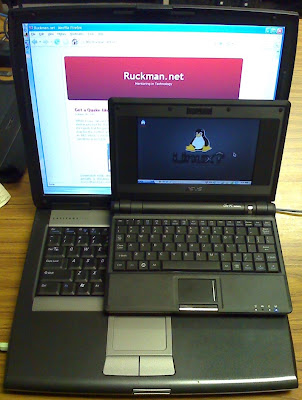
It weights 2 pounds (1 kg).
Operating System/Ease of Use:
EeePC comes preloaded with a specially modified version of Xandros Linux.
Being Linux it has the well known advantages of being fast, safe, rock solid and free. Xandros modified its OS to be usable in screens as small as 7" with the famous tabbed interface, which is now also used by Acer Aspire One.
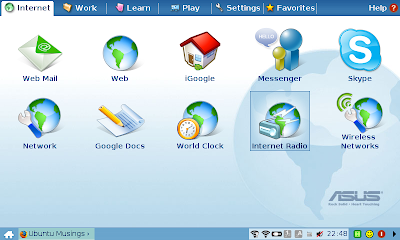
What amazed me was not how easier it was than most Linux distributions bask then. It was much easier than Windows! It had an icon for the internet, for email and for the wireless connection, pretty much the straightforward design you would expect from a cell phone. I clicked the wireless icon and a window with available networks opened. I selected one of the free ones and it connected with the first attempt i ever made on wifi. I also tried a Huawei E170 3G usb and it did not ask me for drivers. No need for drivers, no configuration(for the wifi, 3G needed username/pin), NOTHING TO WORRY ABOUT.
Preinstalled software was Firefox, Openoffice, Thunderbird, Amarok and a video player. It also had antivirus installed, although it does not need it(It serves more to protect windows users from infected files that can't harm Linux)
Speed:
EeePc owes its speed not only to Linux, but to the solid-state drive as well. It booted and opened openoffice faster than my Core Duo laptop! Moreover, thanks to the solid-state disk, which has no moving parts, the battery lasts longer and it is more resistant to falls.
Conclusion:
Asus EeePC had some remarkable accomplishments:
Let Linux haters shout as much as they like! EeePC is an amazing success story.
I did not chose the "surf" Edition, as it had smaller solid-state disk(2gb instead of 4) and no camera. The processor was also clocked lower and the price difference only 30 euros(42$).
Manufacturing Quality:
Being manufactured by Asus, one of the best hardware vendors in motherboards and video cards, i expected nothing less than top quality. It turned out i was right.
It weights 2 pounds (1 kg).

Operating System/Ease of Use:
EeePC comes preloaded with a specially modified version of Xandros Linux.
Being Linux it has the well known advantages of being fast, safe, rock solid and free. Xandros modified its OS to be usable in screens as small as 7" with the famous tabbed interface, which is now also used by Acer Aspire One.

What amazed me was not how easier it was than most Linux distributions bask then. It was much easier than Windows! It had an icon for the internet, for email and for the wireless connection, pretty much the straightforward design you would expect from a cell phone. I clicked the wireless icon and a window with available networks opened. I selected one of the free ones and it connected with the first attempt i ever made on wifi. I also tried a Huawei E170 3G usb and it did not ask me for drivers. No need for drivers, no configuration(for the wifi, 3G needed username/pin), NOTHING TO WORRY ABOUT.
Preinstalled software was Firefox, Openoffice, Thunderbird, Amarok and a video player. It also had antivirus installed, although it does not need it(It serves more to protect windows users from infected files that can't harm Linux)
Speed:
EeePc owes its speed not only to Linux, but to the solid-state drive as well. It booted and opened openoffice faster than my Core Duo laptop! Moreover, thanks to the solid-state disk, which has no moving parts, the battery lasts longer and it is more resistant to falls.
Conclusion:
Asus EeePC had some remarkable accomplishments:
- It created a whole new category, the netbooks and was soon followed by HP 2133, Acer Aspire One, MSI Wind and now Dell Mini 9.
- It forced Microsoft to keep selling XP(where the 200.000 signature petition failed), as netbooks don't have the horsepower Vista needs compared to Linux and XP.
- It made Linux mainstream. 2007-2008 was probably the long sought Year Of Desktop Linux . (well, Netbook to be precise!)
Let Linux haters shout as much as they like! EeePC is an amazing success story.
Subscribe to:
Posts (Atom)
